用直方图匹配实现批量图像匀色(16位多波段TIF)
用直方图匹配实现批量图像匀色(16位多波段TIF)
ytkz大家好,我是小白说遥感,今天我们来聊聊图像处理中的一个实用技巧——直方图匹配(Histogram Matching)。
如果你是遥感、GIS、摄影或AI图像处理的从业者,肯定遇到过图像颜色不一致的问题。比如,多张卫星图像拼接时,颜色偏差会导致整体效果不佳。
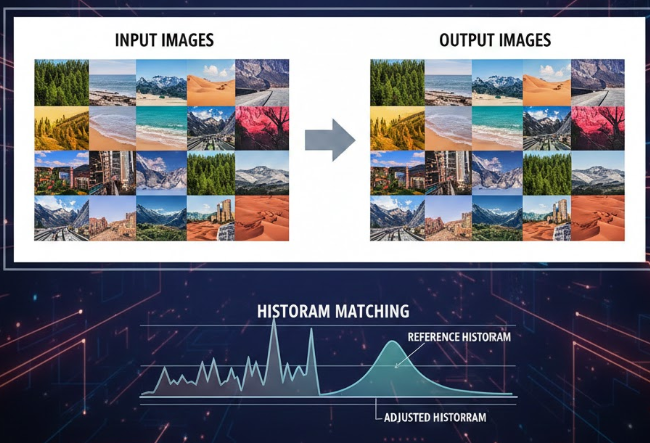
这时候,直方图匹配就能派上用场,它可以让目标图像的颜色分布匹配模板图像,实现“匀色”效果。
本文基于一个Python脚本,详细教你如何实现批量处理16位、4波段TIF图像的直方图匹配。脚本使用分块处理,适合大图像,避免内存溢出。
我会一步步解释代码原理、如何运行,以及一些优化建议。无论你是新手还是老鸟,都能学到东西,以后自己复习也方便。
为什么需要直方图匹配?
在图像处理中,直方图表示像素值的分布(比如亮度从0到255)。不同图像的直方图可能差异很大,导致颜色不匹配。

直方图匹配的核心是:
- 计算模板图像和目标图像的累积分布函数(CDF)。
- 通过映射,让目标图像的CDF匹配模板的CDF,从而调整像素值,实现颜色一致。
优势:
- 简单高效,尤其适合遥感图像(如卫星DOM)。
- 支持多波段(RGB+Alpha或多光谱)。
- 对于16位图像(像素值0-65535),比8位更精确,保留更多细节。
缺点:如果图像内容差异太大,效果可能不理想(比如一个是城市,一个是森林)。
脚本概述
这个脚本使用rasterio库处理TIF文件(GeoTIFF),结合numpy进行计算。关键特性:
- 输入:一个模板TIF、一个输入文件夹(含多个TIF)、一个输出文件夹。
- 输出:每个输入TIF匹配后的新TIF,保留原地理信息和数据类型。
- 分块处理:图像太大时,分块读写,块大小1024x1024(可调)。
- 适用:16位无符号整数(uint16),4波段图像。如果你的图像是8位或其他,稍改即可。
完整代码如下(已优化为批量处理):
#!/usr/bin/env python
# -*- coding: utf-8 -*-
# @Time : 2025/12/8 14:10
# @File : color_mapper.py

import sys
import os
import rasterio
from rasterio.windows import Window
import numpy as np
import time

def compute_histogram(src, band_idx, bins=65536, range_min=0, range_max=65535):
    hist = np.zeros(bins, dtype=np.float64)
    height, width = src.shape
    block_size = 1024  # Adjust block size based on memory

    for row in range(0, height, block_size):
        row_height = min(block_size, height - row)
        for col in range(0, width, block_size):
            col_width = min(block_size, width - col)
            window = Window(col, row, col_width, row_height)
            data = src.read(band_idx, window=window)
            block_hist, _ = np.histogram(data.flatten(), bins=bins, range=(range_min, range_max + 1))
            hist += block_hist

    return hist

def normalize_hist(hist):
    total = hist.sum()
    if total == 0:
        return hist
    return hist / total

def get_cdf(hist):
    return hist.cumsum()

def get_mapping(cdf_src, cdf_ref):
    mapping = np.interp(cdf_src, cdf_ref, np.arange(65536))
    # Normalize to 0-65535 and cast to uint16
    mapping = (mapping - mapping.min()) / (mapping.max() - mapping.min()) * 65535
    return mapping.astype(np.uint16)

def apply_mapping(data, mapping):
    return mapping[data.astype(np.uint16)]

def multi_channel_hist_match(template_path, source_path, output_path):
    with rasterio.open(template_path) as template_src:
        with rasterio.open(source_path) as source_src:
            if template_src.count != source_src.count:
                raise ValueError("Template and source must have the same number of bands")
            if template_src.count != 4:
                raise ValueError("Input images must have 4 bands")
            if template_src.shape != source_src.shape:
                print("Warning: Template and source have different shapes, but proceeding assuming compatible")

            profile = source_src.profile
            # No update to dtype, keep original (assuming uint16)

            num_bands = source_src.count

            with rasterio.open(output_path, 'w', **profile) as out_dst:
                for band_idx in range(1, num_bands + 1):
                    # Compute histograms
                    hist_ref = compute_histogram(template_src, band_idx)
                    hist_src = compute_histogram(source_src, band_idx)

                    # Normalize
                    hist_ref_norm = normalize_hist(hist_ref)
                    hist_src_norm = normalize_hist(hist_src)

                    # CDFs
                    cdf_ref = get_cdf(hist_ref_norm)
                    cdf_src = get_cdf(hist_src_norm)

                    # Mapping
                    mapping = get_mapping(cdf_src, cdf_ref)

                    # Apply mapping block by block
                    height, width = source_src.shape
                    block_size = 1024

                    for row in range(0, height, block_size):
                        row_height = min(block_size, height - row)
                        for col in range(0, width, block_size):
                            col_width = min(block_size, width - col)
                            window = Window(col, row, col_width, row_height)

                            data = source_src.read(band_idx, window=window)
                            matched_data = apply_mapping(data, mapping)

                            out_dst.write(matched_data, band_idx, window=window)

    print(f'Output saved to {output_path}')

if __name__ == '__main__':
    if len(sys.argv) != 4:
        print("Usage: python script.py template_tif input_folder output_folder")
        sys.exit(1)

    template_path = sys.argv[1]
    input_folder = sys.argv[2]
    output_folder = sys.argv[3]

    if not os.path.exists(output_folder):
        os.makedirs(output_folder)

    start_time = time.time()

    for filename in os.listdir(input_folder):
        if filename.lower().endswith(('.tif', '.tiff')):
            source_path = os.path.join(input_folder, filename)
            output_path = os.path.join(output_folder, filename)

            print(f"Processing {filename}...")
            try:
                multi_channel_hist_match(template_path, source_path, output_path)
            except Exception as e:
                print(f"Error processing {filename}: {e}")

    print(f'All processed in {time.time() - start_time} seconds')
代码详解:一步步拆解
1. 依赖库导入
- rasterio:处理GeoTIFF,读写图像元数据、波段数据。
- numpy:计算直方图、CDF、插值。
- os/sys/time:文件操作、命令行参数、计时。
2. 计算直方图
- 分块读取图像(block_size=1024),避免大图内存爆炸。
- 使用np.histogram计算每个块的直方图,累加。
- bins=65536(16位),范围0-65535。
3. 归一化与CDF
- 归一化:hist / total_pixels,转为概率分布。
- CDF:累积求和,用于匹配。
4. 映射函数
- 归一化到0-65535,确保输出uint16。
- apply_mapping:用映射表替换像素值( LUT 查找表)。
5. 主函数
- 打开模板和源图像,检查波段数。
- 复制源文件(CRS、变换等),创建输出文件。
- 逐波段:计算直方图相关信息。
- 分块应用mapping,写入输出。
6. 主程序
- 命令行参数:模板路径、输入文件夹、输出文件夹。
- 遍历输入文件夹的所有TIF,逐一处理,输出到新文件夹。
- 异常捕获,防止单个文件出错中断批量。
如何使用脚本?
准备环境:
- Python 3.6+。
- 安装rasterio(pip install rasterio)和numpy。
- 如果是GeoTIFF,确保GDAL安装正确(conda install gdal)。
运行命令:
python color_mapper.py template.tif input_dir output_dir- template.tif:颜色标准的模板图像。
- input_dir:含待处理TIF的文件夹。
- output_dir:输出文件夹(自动创建)。
示例:
假设模板是ref.tif,输入文件夹,images/
有10张TIF,输出到matched/
python color_mapper.py ref.tif images/ matched/输出:每个TIF处理后保存到matched/,文件名不变。控制台显示进度和总耗时。
测试小图像: 先用小图像测试(比如1000x1000),确保无误再批量大图。
注意事项与优化
结语
直方图匹配是图像处理的基础技巧,这个脚本让你轻松批量匀色大TIF图像。实践是最好的老师,赶紧下载代码试试吧!如果有问题,欢迎评论区留言。未来我还会分享更多GIS/Python教程,记得关注小白说遥感哦~
本文基于实际代码编写,日期:2025-05-08。